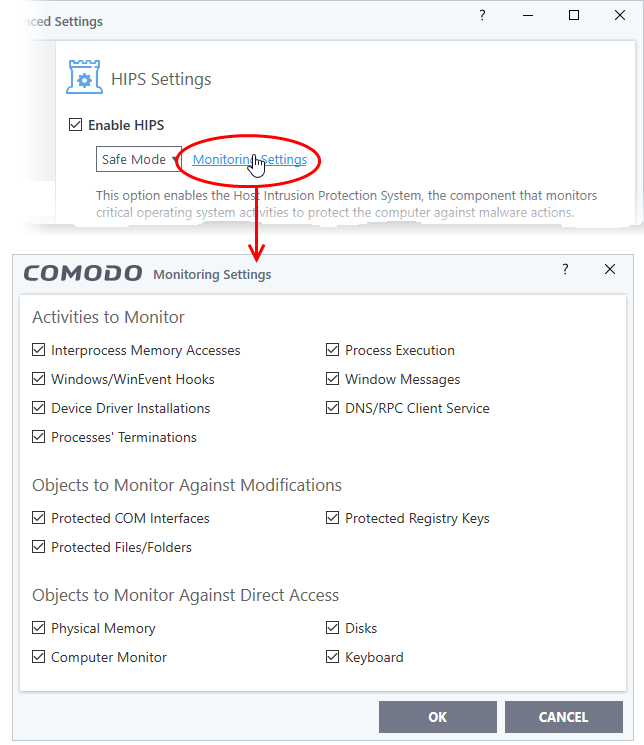
I remember before Little Snitch there was ZoneAlarm for Windows[0] (here is a good screenshot[1]). No clue if the current version of ZoneAlarm does anything like that (have not used it in 2 decades). I always found it weird that Linux never really had anything like it.
If I remember correctly, it runs as a commodity and patches the socket library. Interestingly, the socket library was not re-entrant (unusual for Amiga libraries) so I had to patch the Exec OpenLibrary() function to monitor the loading of new copies of the socket library. But it's been a long time so memories are hazy.
It'll be interesting to see if it is still compiles and runs for modern AmigaOS, if any active Amiga programmers are around to see.
Run OpenSnitch for a while and you'll quickly realize how much of your system does phone home. Off the top of my head:
- GNOME Shell (extension updates without a way to disable this, weather),
- GNOME Calculator (currency exchange rates),
- NetworkManager (periodic hotspot portal checks in most configurations),
- GDB (debuginfod enabled by default),
- Firefox (extension updates, push notifications, feature flags, telemetry, ..., some parts cannot be disabled),
- VSCodium (Open VSX callbacks even when installing extensions from disk with updates disabled, JSON schema auto-downloads, extensions making their own unsolicited requests, ...),
- Electron (dictionary updates from Google servers, no way of disabling; includes any application running on top of upstream Electron, such as Signal, Discord, etc.),
- GoldenDict (audio samples fetched from the Internet on word look-up, no way to disable)
Of course, this is nothing compared to Windows [0] and macOS [1], but the malpractice of making Internet connections without asking, by default, has unfortunately been finding its way everywhere since modems stopped making audible sounds.
Having read about PRISM and seen the leaked dashboards of Paragon Graphite (said to be used by ICE), and with LLMs bridging the gap between mass and targeted surveillance, I don't want any of this.
Per se? No, maybe with the exception of GNOME Shell which literally runs code from the Internet unsandboxed. Can the traffic they silently generate be used for malicious purposes? Absolutely.
It contains Firefox and Chromium. You are right that they may call home, but at least it's very limited and easily configurable. Could be too much for you but fine with me. Also Debian does change their config by default to minimize privacy issues: https://news.ycombinator.com/item?id=32582260
It's far from easy in the case of Firefox [0], and the last time I tried, some .mozilla.com domains would still get pinged. Chromium doesn't even have an official guide. The only options I found to be reliable are source-level patches, i.e. ungoogled-chromium and LibreWolf.
Note that LibreWolf still leaves some of the stuff on for you to manually disable (dom.push.connection.enabled, extension updates).
I ran ntop on a router in 2001. It had a highly insightful overview of traffic with nice looking diagrams and everything. There hasn't been anything like that since as far as I'm aware.
ZoneAlarm otoh, was snakeoil. Programs that ran at the same privilege level (typically everything) could bypass it in various ways.
I helped administer the CheckPoint commercial version of this before 2010 in a large enterprise (Checkpoint Integrity it was badged as). Really good product though we did have some bugs with it - I do remember the developers from Israel got involved and were very capable.
It mostly worked exactly as you would want a desktop firewall to, and integrated nicely with Cisco VPN tech, so you could ensure Integrity was operating correctly before fully opening up the tunnel for access to corporate assets.
This reminded me of running Kerio Personal Firewall. When Kerio ended I switched to either ZA or Comodo firewall, one of them introduced a neat feature of running executables in containers. Made clicking random things so much easier. But the best part with all of these was restricting windows to where it could barely do anything. "RandomXYZ.DLL wants to execute random what and connect to random where? I dont think so MS." lol
Wow. Insane throwback. I think I first learned about ZoneAlarm from some PC magazine my parents bought for me. Completely forgot about this great piece of freemium!
if anyone else suddenly started wondering, PC magazines still exist in physical form. There are even still Linux magazines that come with installer CDs for distros. And all kinds of other magazines as well, like for Mac computers, for photo editors, for Raspberry Pi etc.
There was also Tiny Firewall which got bought by Computer Associates around 2005. Probably the most complicated or fine grain control for me at that time in Windows XP.
This is what I used! At some point I managed to block DHCP lease renewals on my computer, and Internet would always stop working after a given timespan. Took a good while to figure out I caused the problem myself.
No, the Windows firewall in its default configuration does not restrict outbound connections in any way. Any application can make any outbound connection it wants. If an application attempts to listen for incoming connections from external sources and there is not an existing policy, Windows will pop up a dialog asking the user if they want to allow this and if so whether it should be allowed to listen on all networks, only networks marked as "private", or for domain-bound corporate computers only networks where the domain controller is reachable.
It can be manually configured with very detailed policies, but you have to know where to go to find those controls.
It's been a while since I used ZoneAlarm or Little Snitch, but the last time I used either one the default behavior was instead that any connection attempt or attempt to listen for which there was not a policy would result in a dialog showing all the details about what application is looking to connect to or receive connections from what as well as a variety of options for creating a policy or even not creating a policy and just deciding whether that one connection would be allowed.
Also back when I used ZoneAlarm I had dialup so the taskbar addon they had which showed realtime bandwidth usage and what applications had active connections was really useful. It also had a big red "Stop" button that would immediately disable all connections, which thinking about it in retrospect really makes me miss the more innocent days of the internet.
I'm not a Little Snitch or Open Snitch user, I wonder if these firewalls are able to block requests done with the use of some other, allow-listed program.
Say I run a script `suspicious.py' and I deny this script from making any network requests. I also have firefox which is allowed to make any HTTPS requests. If suspicious.py does something like:
The SELinux MAC policy should restrict which files and ports each process may access. In general, most modern distro have this feature, but normal users do not go through the rules training and default enable flag setup. =3
It depends. Little Snitch for Linux has a two level namespace for processes. It takes the process doing the connection and its parent process into account when evaluating rules.
Also: If an interpreter is run via `#!/bin/interpreter` in the script binary, it makes the rule for the script file path, not the interpreter. This does not work when running the script as `interpreter script`, though.
With the literal rules described it would not be blocked. A more detailed rule (in Open Snitch at least, not as familiar with the other variants) could match e.g. whether the process's parent tree contained the python binary rather than just if python is the process binding the socket.
Not necessarily (with Open Snitch at least), it just depends how complex you want to make your firewall rules and what the specific goal is (block this specific script, block scripts which try to do this activity, block connection to evil.net, block python scripts, etc).
The more granular one gets the more likely they aren't really meaning to ask how to do it in the firewall layer though. E.g. if we take it further to wanting to prevent python -c "specific logic" it's clearer what you can do in the firewall is not necessarily the same as what's practical or useful.
The allow rule for Firefox is what would suppress the prompt. You probably don't want to have a prompt for every Firefox connection though, so you'd need to come up with some kind of ruleset (or get very annoyed :D).
I know it sounds crazy at this point, but with popular YouTubers switching to Linux, gamers overall well-aware of Steam on Linux advantages and switching as well, plus popular software like LittleSnitch getting ported, 2026 can without irony be named as Year of Linux Desktop, right?
I think there is a lot of talk (and this is good), but very little action. Market share is still incredibly low for LNX. I believe only a small subset of people actually attempt the jump from WIN to LNX (since most just want to play their games and run their programs without hassle) and then quickly realize that its tougher than they anticipated and swiftly return to WIN.
This is true, but also the original comment still stands: Linux desktop usage outside developers was so low that it was barely worth mentioning before, so even a small uptick like this is a serious change, and it's how bigger changes start.
I definitely don't think it's even the likely outcome, but for Linux to get serious traction this is how it has to start: power users but not the traditional developer crowd start actually moving, and in doing so produce the guides, experience, word of mouth, and motivation that normal people need to do so, alongside the institutional support from Valve to actually fix the bugs and issues.
It remains to be seen if a critical mass will find it usable long-term, but if it were to happen, this is how it would look at the start, and Microsoft are certainly doing their best to push people away right now, although I suspect the real winner is more likely to be Apple with the Macbook Neo sucking up more of the lower end.
> Microsoft are certainly doing their best to push people away right now
According to a blog post by Eric S. Raymond in September 2020, Microsoft is literally moving towards replacing Windows' internals with Linux. Unfortunately, that post is now unreachable, but searching for "eric raymond article about windows being replaced with a linux kernel" finds many third-party references to it and summaries of it.
As someone who did make the jump, it was actually a lot easier than I anticipated. I encourage others to do the same. The only games I can't play are some AAA multiplayer games I wasn't particularly interested in anyways.
5% on the steam survey though. The jump isn't quite as big from previous years as it seems as they did some corrections to the statistics this year, but 5% is nothing to sneeze at.
I wouldn't be too exited. Statistics like this are very problematic.
For example, I have Steam installed on my Macbook pro and I occasionally play a single very simple game there. Does that make me a macOS gamer? of course not. The vast majority of games I want to play don't work on macOS.
I suspect that most of those 5% are just Linux users who have steam installed and play a small amount of games. Some probably just installed it to check what's available and don't play anything.
Everyone I know who is a "serious" gamer, as in exited about upcoming releases of AAA games is using Windows.
Also unrelated, but more linux gamers proves my personal observation that on the spectrum of computer literacy gamers are just below powerusers and programmers. We see more less technical people migrate over to Linux gradually and now it's gamers turn. Well, that's kind of obvious for everybody except Microsoft apparently.
Wifi has been working out of the box for close to 20 years now. On some computers with old Broadcom cards, you have to enable non-free drivers. What model are you using?
Recently I was wondering how viable it is to launch a niche, paid tool for Linux. I found that this is a very rare model, most tools are either just free, supported by sponsorship, supported by some paid cloud-based service that accompanies the tool, use an open-core model with paid add-ons.
I wonder if the decision of Little Snitch to make the Linux version free forever was also informed by this "no way to make money selling tools on Linux" wisdom or if there was another motivation. It seems that if any tool has chances of making decent money on Linux, a product like Little Snitch, which is already well established, with working payment infrastructure would be a good candidate.
Many from linux crowd are slightly paranoid and ideological.
I'm as a linux user very reluctant to install anything proprietary that has such sensitive info as my network traffic and would rather use opensnitch or any other foss fork.
The same time I don't mind to pay for open-source, I donate several thousands USD per year to FOSS projects. But I guess I'm in a minority here and if you make the whole stack open-source you're not going to make many sells really.
Sorry, we have not tested on Fedora before release. Did not expect so much interest in the first hours after release...
I have now installed Fedora in a VM (ARM64 architecture, though) and it does load, but cannot identify processes. I'm investigating this now.
The other issue seems to be with eBPF compatibility. That's a moving target and I'll investigate next. But resources are limited, I'll need some time to dig into this.
There's some good feedback in the GitHub issue on the subject, seems to happen on slightly newer versions of the kernel than the one you've tested on and affects other distros like Arch as well. I'll keep an eye on the discussion and test again once updates are ready.
Yeah, because no third party program has ever crashed on any other OS.
Come on, this is an absurd comment. Linux has its issues, this is not a serious example of what is keeping normal people from using Linux as a desktop OS. Normal people are not installing the first release of a privacy networking tool that requires you to OK connections.
99,9% of the time, you download an exe or a DMG, you can be pretty sure it's going to work. Even 3 star github repo.
Only on Linux you get weird bug, compilation issues, etc.
After all, you have windows, macos and then you have Linux : debian, Ubuntu, fedora, arch, opensuse. That's almost like 5 different os just for Linux.
Sure you can use flatpack and force people to download 2gb installation for something that requires 20mb on windows and macos. That excludes all of the people who don't have fiber internet.
At this point I'm convinced that those developing Linux don't want it to be an os for casuals and prefer to stay in their small, niche community. That's fine by me but it makes claim of Linux desktop year laughable, which I was referring to.
That's not the user experience though, the user experience is it says "go to the discover app and install <program>" and they do that and it just works. Downloading a tarball is not the normal way to install stuff on Linux, and given everyone has phones where the standard is "install on the app store", it's hardly some new experience, in fact, it's more natural for normal users.
I just tried littlesnitch and it did not resolve very many ips to domains, which is pretty basic. It also failed to identify most processes, and they were grouped under "Not Identified". It appears these are known limitations of the Linux version [1]. So for that alone I need to stick with opensnitch.
[1] "Little Snitch for Linux is built for privacy, not security, and that distinction matters. The macOS version can make stronger guarantees because it can have more complexity. On Linux, the foundation is eBPF, which is powerful but bounded: it has strict limits on storage size and program complexity. Under heavy traffic, cache tables can overflow, which makes it impossible to reliably tie every network packet to a process or a DNS name. And reconstructing which hostname was originally looked up for a given IP address requires heuristics rather than certainty. The macOS version uses deep packet inspection to do this more reliably. That's not an option here." -- from https://obdev.at/products/littlesnitch-linux/index.html
I guess that makes sense, since it's pretty new. OpenSnitch is great software in terms of functionality but I find the UI lacking. If LittleSnitch can keep the same functionality, while improving the UI, I'm switching. My other current concern here is that the LittleSnitch UI is just a Webview and I think it would be much better if there was a native option (ideally GTK-based for me, but Qt would also be acceptable). Webviews are slow and full of bloat.
Regarding unidentified processes: Little Snitch daemon must have been running when the process started in order to identify it reliably. It's best to reboot after installation so that Little Snitch starts before everything else. I should probably note this somewhere.
And regarding failed reverse DNS names: Little Snitch is sniffing DNS lookups. If lookups are encrypted, there is little it can do. We usually recommend DNS encryption at the systemd layer, not at app layer. This way we can see lookups on 127.0.0.53 and the actual lookup sent out is still encrypted.
Also, it's currently only sniffing UDP lookups, not TCP. The eBPF part is already very close to the complexity limits (700k instructions of allowed 1M) and adding TCP parsing would exceed this limit. It should be possible to forbid TCP port 53 with a rule, though. Some complex DNS lookups will fail, but routine things should still work.
"I researched a bit, found OpenSnitch, several command line tools, and various security systems built for servers. None of these gave me what I wanted: see which process is making which connections, and in the best case deny with a single click." https://obdev.at/blog/little-snitch-for-linux/
I've used OpenSnitch for years, and while LittleSnitch definitely has a better UI for showing which process is making which connections over time, OpenSnitch does a pretty good job here. I get a modal popup when a program that hasn't made a connection tries to make a connection, and I can either allow/deny in one click, or further customize the rule e.g. allowing ntpd to connect, but only to pool.ntp.org on port 123.
Where LittleSnitch is definitely ahead is showing process connections over time after said process has been allowed.
Personally I'd be fine with a commercial license with source available here... the issue isn't the price, it's the fact that you're asked to MITM every network connection you make under the control of a binary blob.
I think it's fair to ask that a developer choosing to build a thing that requires that kind of access should be expected to err on the side of transparency.
Shameless plug: for anyone who wants something fully open source and terminal-based, I maintain RustNet (https://github.com/domcyrus/rustnet). It's a bit different because it's a TUI for real-time connection monitoring with deep packet inspection, not a firewall. No blocking/rules, but it's cross-platform (Linux/macOS/Windows), the entire codebase is open, and it sandboxes itself after init via Landlock with capability dropping.
Okay hear me out, I use little snitch for a while. Great product. Love finding out what phones where. I make every single request (except my browser, because I'm fine with their sandbox) block until I approve.
Recently I was wondering how you really have to trust something like little snitch given its a full kernel extension effectively able to MITM your whole network stack.
So I went digging (and asked some agents to deep research), and I couldn't find much interesting about the company or its leadership at all.
All a long way to say, anyone know anything about this company?
Disclaimer: I'm the developer of Little Snitch for Linux. Regarding MITM concerns: The eBPF component, which actually sees all the traffic, is Open Source (GPLv2). You can review it on Github and verify whether it sends any data to user space: https://github.com/obdev/littlesnitch-linux
But the trust issue is still real, the daemon has to run as root because it needs to watch for new mounts and keep a table of file system roots up-to-date, even after loading all the eBPF programs. As a root process, it can technically do whatever it wants. Unless you limit it with a kind of mandatory access control (SELinux or similar).
This is the very first release and we will probably come up with a more restricted permission requirement in the future. For the moment, I try to catch up with bug reports. There seems to be more diversity in the Linux landscape than I had expected.
> All a long way to say, anyone know anything about this company?
Yes, they are indie Mac developers who have been in business for more than 20 years, and Little Snitch for Mac is beloved by many users for a long time.
Like how it happened for Bartender, another macOS app which required a lot of permissions. It was sold to a company and they told no one, until a user noticed via the now defunct MacUpdater that the app signature changed.
Ben Surtees (Bartender’s original developer) burned all the good will accumulated over years in one moment. Never again can anyone trust software under that name.
Bartender was not a supply chain attack! The app was sold for monetary reasons to another developer for monetary reasons.
There were no targets involved. There were no nation-states involved. There were no attacks involved. You might not like the new developer, but this whole discussion of a nation-state and 9 figure payoff is totally ridiculous.
Depends on the target and what you can get. Think about Bartender, an app requiring an insanely high level of trust and permissions, which was quietly sold.
If you know of someone specific you want to target who uses it, the investment could pay off.
For example, we know from your blog posts that you use LittleSnitch. Someone who wanted to target you might do a lot to spy on you by buying LittleSnitch, probably.
Think of your own apps, too. I don’t think you’d do the same that Ben Surtees did and sell everything in secret, but then again I don’t personally know you. You may have a price that I’m not aware of. For that reason alone, even as I trust the current code is not nefarious, I can never give StopTheMadness access to every website and can only use it selectively, which is inconvenient.
The point is that it shows it can happen. You’re a browser extension developer, surely you know how often it happens that developers of popular extensions are approached by shady businesses and sometimes do even sell.
> You can dream up a bunch of absurd hypothetical scenarios, but they are not the reality.
As someone else has pointed out to you, not hypothetical.
> Nobody wants to target me. Nobody cares about me. I am insignificant.
You give yourself too little credit. I know of several developers and other people with influence who use your extensions with complete trust. Compromising you means compromising them, which means compromising even more people. Jia Tan has aptly demonstrated you don’t need to directly attack your final target, only a link in the chain, even if it looks insignificant.
> surely you know how often it happens that developers of popular extensions are approached by shady businesses and sometimes do even sell.
Yes, developers of free extensions who sell for a pittance.
I don't have a popular extension. My extension is relatively expensive and thus unpopular. I don't have enough users to be interesting to shady businesses. My extension is more valuable to me than to anyone else, because I, one person, can make a living from it.
> As someone else has pointed out to you, not hypothetical.
That link seems a bit silly. There's a screenshot with no explanatory context whatsoever. There's a list of items, many of which look quite mundane and uninteresting. Certainly it is not suggesting acquiring the company for millions of dollars. It sounds like someone—could even be an intern for all we know—is interested in attacking the app from the outside.
> I know of several developers and other people with influence who use your extensions with complete trust. Compromising you means compromising them, which means compromising even more people.
What is the value of compromising these people? Oh noes, the CIA can now write Daring Fireball articles!
> Jia Tan has aptly demonstrated you don’t need to directly attack your final target, only a link in the chain, even if it looks insignificant.
What chain? I have no third-party dependencies. If someone can compromise Apple's operating systems, then my software or Little Snitch is the least of our worries.
I do specifically and intentionally avoid using NPM, because of frequent compromises. Little Snitch is not even JavaScript, so no worries there.
Various intelligence agencies are willing to pay 2-3M for a working exploit for iphone or android. I think that they would be fine with paying 50M for a userbase that has a high population of devs, admins, etc. Being able to backdoor someone like this in the right organization down the line is probably worth 50M.
> Said motivation could be a nation state handing them $XXX million dollars
You're missing the most important part of the motivation here: why in the world would a nation-state give a damn about Little Snitch, especially to the tune of $XXX million dollars?
A nation-state could pay $XXX million to your significant other to spy on you. But again, a nation-state doesn't give a damn about you.
>why in the world would a nation-state give a damn about Little Snitch, especially to the tune of $XXX million dollars?
Per user hacked, it can be very cheap¹ compared to bribing anyone. And give data/access that SO can't get.
State is not interested in you until it does. Being Jewish, Polish, Gypsy, Gay. Or just WrongThinking. Or maybe it becomes super cheap and easy to process all information?
1: it can even be free. You either give us backdoor to all your users or you rot in jail. Here's a complementary beating up or pictures of your kids, to argument our position further.
> it can even be free. You either give us backdoor to all your users or you rot in jail.
It is already a thing, at least in UK and AU [1]:
> Both countries now claim the right to secretly compel tech companies and individual technologists, including network administrators, sysadmins, and open source developers – to re-engineer software and hardware under their control, so that it can be used to spy on their users. Engineers can be penalized for refusing to comply with fines and prison; in Australia, even counseling a technologist to oppose these orders is a crime.
Well, that is obvious, is it not? It means They are interested in The Plan and have enough power that a vague comment is all you gonna get. Cannot have Them finding out that we are on to Them. Though of course, The Plan already accounts for that, so They already know and will do Something about it. Want facts? Wake up, do your Research!
disclaimer: I co-develop (FOSS) Little Snitch / Open Snitch inspired firewall but for Android
> little snitch given its a full kernel extension
On macOS, don't think Little Snitch needs kernel exclaves / extensions. Apple provides userspace ("Network Extension") APIs (however limited) for apps like Little Snitch to use (instead of pf).
> effectively able to MITM your whole network stack
"MITM" means something else, anywho... if network observability (not firewall) is the primary need, cross-platform (GUI) sniffers like Sniffnet exist: https://github.com/GyulyVGC/sniffnet
cool to see eBPF used for a desktop firewall instead of just ddos packet dropping. the note about bpf map overflows is super relatable, dealing with that on bare-metal is a pain.
my question is... if the tracking maps fill up completely, does the daemon fail-open or fail-closed?
Probably should throw it out there that I'm building something inspired by littleSnitch for windows. Currently a bit stealthy about it. But when I crowd source the funding for a code signing cert I'll get it out there. Lots of inspiration from LittleSnitch, in spirit if not actual code.
I'd be curious to hear additional details if you can share - got a timeline, or somewhere I can enter my email address for updates? I'd love to alpha/beta test if you're looking for testers.
I've been a GlassWire user for years, which partially fills the role of LS, but not very well. Aside from the many performance issues I've seen, it's missing a lot of LS essentials. To be fair, I think the focus of GlassWire is more about visualizing traffic on your Windows computer, but I definitely believe there is a need for better Windows network software for power users.
I'm so surprised that so few people have heard of Portmaster, it's been around for years and runs on Linux (and Windows if you must). And if you don't need traffic history it's free.
There was a similar Show HN from 3 weeks ago.
https://news.ycombinator.com/item?id=47387443 (open source too) - and there is a live window from all the machines in the swarm. https://dialtoneapp.com/explore - but only 2 so far. Maybe LittleSnitch can generate more data than this? Could end up an immune system for bad actors.
Anything new to get much better performance from low-spec machines that is idiot-proof is a game-changer.
Incredible. LittleSnitch is must-have for macOS and trying to get equivalent functionality on Linux was painful. So very happy to see this, and very happy to give the developers at Objective Development my money.
In linux, I trust most distro apps to run with network access without any sort of firewall. And for apps from internet, just put them in bubblewrap or run with flatpak without access to homedir, network, audio, video etc. depending on program.
You are referring to the TCP three way handshake problem here. The macOS version is bound by the API provided by Apple: We get the API call for filtering only after the three way handshake has started.
The Linux version is limited in complexity. It has to decide immediately. This has the consequence that no packet leaves the machine if the connection is denied, but on the other hand it means that it's easier to trick. The macOS version can inspect the first packet sent (deep packet inspection) to find the remote host name in TLS headers. The Linux version relies on heuristics: The most recent lookup seen which returned the IP address determines the name. This part is Open Source and you can inspect the algorithm.
I’ve been researching the “best” way to build a little outbound network proxy to replace credential placeholders with the real secrets. Since this is designed to secure agents workloads, I figured I might as well add some domain blocking, and other outbound network controls, so I’ve been looking for Little-snitch-like apps to build on.
I’ve been surprised to find that there aren’t a ton of open source “filter and potentially block all outbound connections according to rules”. This seems like the sort of thing that would be in a lot of Linux admins’ toolkit, but I guess not! I appreciate these guys building and releasing this.
Something almost no firewalls get right is pausing connections (NOT rejecting them) until I've decided whether to allow or not. The only firewalls I've seen do this are Little Snitch for Mac, and Portmaster for Windows (before they made it adware / started locking existing local features behind the subscription).
I use Portmaster (on Linux) and I have never seen ads (either in the app or apps that get their DNS from Portmaster) on it. About the only thing I saw different between the free version and the base level paid for version was traffic history and weekly reports (and badges on Discord if that's your kind of thing).
OpenSnitch seems to do this just fine? Unless I’m misunderstanding your point. Connections seem to just block until I take an action on the dialog. Now, if an application itself has specified a short timeout (looking at you, NodeJS-based stuff), that obviously doesn’t help. But for most software it works great.
Firewalls don't do this because they are built at the wrong layer to do proper pending calls. It's too narrow of a design space for most firewalls to care.
True, most firewalls aren't built to pause for user input. But then again, that's why almost no firewall software is suitable for this user experience.
Is that true? If so, that’s not a good sign. I remember how impressed I was by ZoneAlarm in the early 2000s asking permission for itself to connect to the Internet, using the exact same dialogue it presented for any other program, with no dark patterns suggesting that the user should give preferential treatment to it.
Doesn't seem to be, I can see LittleSnitch itself connecting to yoyo.org and obdev.at. GP may be referencing a past bug, either in LittleSnitch or macOS.
Will there ever be anything like Comodo Firewall's HIPS firewall on Linux [0]? I remember when firewalls like ZoneAlarm could detect keyboard hooks from keyloggers and such. Comodo Firewall has had this for over a decade, but unfortunately they are not free anymore. For how open Linux is, it surprises me you can't handle things apps are doing on an alert by alert basis, and not just network permissions. Firewalls used to detect DLL injections, apps creating script files to run, adding stuff to start up. Now it seems firewalls only means network detection.
Wow. I have used Little Snitch on Mac for years, love this!
If anyone from obdev is reading, please give us a way to pay for it, even if it stays free :), I'd love to support development and would happily pay something between the price of Little Snitch and Little Snitch Mini.
They are still restricting iCloud Private Relay to Safari for the most part. iOS is really wanting for privacy improvements to close the gap between marketing and reality.
Fun fact: iOS lets developers spy on when you _dismiss_ notifications:
Ever instantly angry-swipe-to-clear a DM notification soon as it hits your lockscreen from someone who upset you? Zuck knew y'all had beef.
Clear notifications before bed and in the morning? All those companies could know a bit more about your routine than you would've otherwise revealed if weren't in the habit of using those apps at those times.
--
The kinds of tiny things that would be pretty inconsequential on their own but that you figure maybe the Apple tax would help you avoid.
Related - I'm working on launching Watch.ly[0] (human-in-the-loop for remotely approving network and file system access for agents) in the next week or so. It works similarly, via eBPF (although we can also fall back to NFQUEUE). Supporting 5.x+ linux kernels[1], osx, and windows.
Did not know about LittleSnitch, will definitely check it out.
Congrats to Linux users on getting a great tool from a quality development shop. Objective Development is one of our (Mac users) exemplars for attention to detail and fit & finish.
Congrats to Objective Development for expanding their well-loved tool to a new platform. You guys rock.
Little Snitch is bound to the API provided by Apple. The NEFilterDataProvider API calls `handleNewFlow()` only after sending out the first IP packet.
Version 6 added DNS encryption and in principle we could filter lookups (similar to PiHole) at this level. That brings other issues, though: This filter is system-wide, so process-specific rules (and overrides) would not work. And results can be cached by mDNSResponder. So when a blocklist causes an issue, you may not be able to fix it by simply disabling the blocklist. But it's still something we consider.
Do you understand that you can't redirect the question addressed to you to the devs if that question questions your own statement by pointing out that some important details are not attended to?
Back when I was still using macOS I loved Little Snitch and was a paying customer. And I agree nothing on Linux comes close. Would it be technically feasible to also provide this as a Flatpak to support immutable distros like Bazzite?
I’m not aware of flatpaks specifically having th capability to run system software, daemons, etc. Some other immutable packaging formats should be able to (systemd-sysext at least, and snap iirc).
The core issue is simple and uncomfortable: through automatic updates, a vendor can run any code, with any privileges, on your machine, at any time.
-----
If the author is serious about this, then they should make their own program completely open source, and make builds bit-for-bit reproducible.
For all I know, the proprietary Little Snitch daemon, or even the binaries they're distributing for the open source components, contain backdoors that can be remotely activated to run any code, with any privileges, on your machine, at any time.
This is correct, of course. But I currently can't make the entire project Open Source. My other option would be to keep it completely private (wrote it mostly for myself in the first place).
I think it's still better to make it public and only partially Open Source so that some people can benefit from it. If you don't trust us, that's completely reasonable, just don't install it.
Giving it a shot right now. Very easy setup, intuitive UI, but a lot of requests' processes are not identified (while they could easily be identified, as they belong to the browser that has some, but less, identified calls)
Little Snitch must be running when the process starts in order to identify it correctly. You get less "Not Identified" if you run it for a while, or you should get none if you reboot and Little Snitch can start before everything else.
I would love to fix this requirement, but have not found a way yet.
I know everyone today is used to upgrading every 5 seconds, but some of us are stuck on old software. For example, my Linux machine keeps rebooting and sucks up power in suspend mode because of buggy drivers in 6.12+, so I'm stuck on 6.8. (which is extra annoying because I bought this laptop for its Linux hardware support...)
In theory, it could be possible to get the requirement down to 5.17, but I don't get around the verifier constraints on pre 6.12 kernels. Maybe somebody who is more experienced with eBPF and the verifier can help. This part is Open Source and you can replace it.
An operating system is roughly broken into three parts: the kernel, the core system tools, and the shell (the desktop environment and/or the CLI shell). Linux: Linux kernel, GNU coreutils (usually), KDE/Gnome/etc + CLI shells. macOS: XNU, BSD userland + launchd/etc, Aqua/Cocoa. Windows: NT kernel, Win32/WinRT/etc, Windows Shell.
The systems LittleSnitch uses to do packet inspection are very much OS-specific. There's no generic standard for doing high-performance packet inspection. XNU and Linux are *very* different kernels. Linus Torvalds built Linux from scratch as a monolithic kernel because he wanted a Unix-like OS that wasn't encumbered. XNU is based on the Mach microkernel though XNU is a hybrid or monolithic kernel, not a microkernel. The point is, they have very different heritage and very different systems for... well pretty much everything. So "just *nix under the hood" is kind of true but also completely besides the point as far as packet inspection goes. And even then, while there are a lot of similarities between the core system tools of Linux and macOS, they're still quite different and unless you're limiting yourself to POSIX-standard interfaces (which are only a fraction of the system), you're not going to be able to use the same code on both systems.
More the opposite. macOS is a veneer of nix, but underneath it is the XNU microkernel. Lots more nuance since Apple took over and added a lot of their own performance and API improvements to
You're correct, but for a bit more context: The macOS kernel is XNU, which is derived from/based on the Mach kernel, but heavily modified. The kernel itself is open source but some drivers/kernel extensions are not so it's not actually usable (unless you provide your own implementations of those).
Does anyone know how the blocking functionality works? I worked on some eBPF code a few years ago (when BTF/CO-RE was new), and while it was powerful, you couldn't just write to memory, or make function calls in the kernel.
Is there a userland component that's using something like iptables? (Can iptables block traffic originating from/destined to a specific process nowadays?)
eBPF is extended in every kernel version. There is a layer where you get network packets and return a verdict. Little Snitch uses this type of eBPF function. You can look at the sources on Github.
Just because I did not port the parser for it to Rust. And I thought that the lsrules format is rare for blocklists. If there is popular demand, we can add it.
> For keeping tabs on what your software is up to and blocking legitimate software from phoning home, Little Snitch for Linux works well. For hardening a system against a determined adversary, it's not the right tool.
What would be the right tool to harden in a similar way to little snitch on mac? Meaning intercepting any connection and whitelisting them reliably.
So if this is free to use on linux, what is to stop someone from doing what Colima did to Docker? Aka make a tiny Linux VM on MacOS and package Little Snitch within that?
It barely has any of the features of the MacOS version, there is no shortage of cracks for Little Snitch, and there is Lulu. Other than that, I am not sure.
Little Snitch requires packet inspection. If you ran it in a Linux VM, it will inspect packets within the VM. So... kind of useless for monitoring connections on the host.
Which one? Mac or Linux? For the Linux Snitch, just stop the service. For the macOS Snitch, you need to move the app to the trash via Finder. Only Apple can remove the network extension and they do this only when deleted via Finder.
i will never understand why people will flock to this but opensnitch which is just better, fully open and has existed for longer (on linux) gets ignored.
"Little Snitch for Linux is built for privacy, not security, and that distinction matters. The macOS version can make stronger guarantees because it can have more complexity. On Linux, the foundation is eBPF, which is powerful but bounded: it has strict limits on storage size and program complexity. Under heavy traffic, cache tables can overflow, which makes it impossible to reliably tie every network packet to a process or a DNS name. And reconstructing which hostname was originally looked up for a given IP address requires heuristics rather than certainty. The macOS version uses deep packet inspection to do this more reliably. That's not an option here."
Is this a limitation of the eBPF implementation? Pardon my ignorance, I'm genuinely curious about this.
Yess, the return of the actually good landing page for the technically-minded. Now all they need to do is roll back the macOS one that looks and reads like it was designed by a marketing agency that knows nothing about computers (or even Little Snitch itself).
> You can find Little Snitch for Linux here. It is free, and it will stay that way.
Don't worry, the authors know that there's no point in charging Linux users. Unlike Mac users.
So you might as well make it $0 and the (Linux) crowd goes wild that they don't need to pay a cent.
However...
> I researched a bit, found OpenSnitch, several command line tools, and various security systems built for servers. None of these gave me what I wanted: see which process is making which connections, and in the best case deny with a single click.
OpenSnitch is open source. You don't need to trust it as you can see the code yourself. Little Snitch on the other hand, is completely closed source.
Do you still trust them not to do self-reporting or phoning home, even though it is $0 and closed source?
We have not detected a targeted attack yet.
On the Mac side, we are safe: No dependencies on any third party libraries. Only Apple.
On the Linux side, there is no single big vendor such as Apple who provides all the necessary libraries. I have tried to choose reputable sources from crates.io only, but to be honest, I don't know a secure solution to the problem.
> They don't build their own machines or write their compilers or write their own crpyto code or ... so many other things.
An attack on any of these things has nothing specifically to do with the developers of Little Snitch and would have vastly more widespread and important effects.
Why would you even be talking about Little Snitch if a compiler were compromised?!? Your paranoia here is bizarrely narrow. Little Snitch would be the least of our problems in that case.
The comment was asking about preventing a compromised supplier for the developers.
A supply chain attack can be anywhere in the supply chain to the target. If I, the end user, am the target, then a supply chain attack compromising the developer of LittleSnitch is effective.
I may then be a conduit to compromising other software or components, and would both I and LittleSnitch would be part of the supply chain that could be attacked targeting them.
Many supply chain attacks aim to run malware on the end-users machine to harvest authentication tokens, etc. So pretty much everyone here who is a developer is the target.
> So pretty much everyone here who is a developer is the target.
Are you going to have this same discussion about every piece of software every mentioned on Hacker News? Why are we having it for Little Snitch specifically?
Yeah just yolo install whatever, it’s not like applications or libraries such as axios which have a decade of trusted history would all of a sudden become malicious and do nasty things to developer machines, just chill, everything’s fine.
It’s not really necessary on Linux. Linux systems work without 40 invisible background services phoning home to the mothership to leak your hardware identifiers for FAA702 collection.
I run both (LS on Mac, at least), they do different things - pi.hole is a great ad blocker which applies to all of the devices on your network. Little Snitch is doing something different - it tells you every call that every app you use is making, and allows you to approve or deny each one. So, you can block telemetry for apps, or you can block certain apps from contacting certain servers, or you can just use it to watch what apps on your system are calling out to where.
To clarify, I'm aware that pihole is not intended to run on a client OS, and doesn't monitor at a process level. I'm focused on the intended effect rather than the process itself (blocking malicious/ad servers). And I think I framed my initial question incorrectly as if LS and PiHole as subtitutes. It's perfectly fine and even preferrable to use both as layered protection. I'm just thinking however when it comes for bang-for-buck it seems like PiHole is the better value proposition if you could only set up one.
pi.hole is primarily billed as an ad blocker, but the fundamental way it works is by applying a curated set of DNS lists that are blocked (commonly telemetry and ad servers), and the admin dashboard which is just a web page (therefore works on all platforms, smartphones included) will do the same thing: it tells you every call that every app on every device on your network is making, and you can approve or deny it. You can curate your own list as well and block servers/connections you don't want on the network.
LS afaik operates in the same area where it's intended to be used for privacy. I guess I could see it being useful for people who don't have admin access to their router, but for people who do have such access I would think the benefits of network-wide DNS monitoring/blocking would outweight the costs of having to configure your router settings.
LS seems to not be claiming any security promise on Linux because it can't make any guarantees given eBPF limitations. But the entire purpose is different and there is very little overlap in my view. PiHole is entirely (I think?) just applying the blocklist made easy. LS allows you to build the blocklist in real time.
I would guess that to the extent the blocklists include things that are loaded by applications and not websites, they are almost entirely built by users of something like LittleSnitch or OpenSnitch. This is also entirely doable with wireshark logs, but I think that requires more infrastructure to build into usable lists.
LittleSnitch isn't for ad blocking (only), it is for tracking/blocking/allowing ALL connections from various processes. PiHole only blocks DNS requests to known ad servers.
Completely different thing. A littlesnitch type thing is for all traffic. Pihole is a DNS query thing that prevents various ad content from being loaded. It's also trivially easy for a malicious application with network access to bypass any instance of pihole on your LAN by doing its own DNS over HTTPS lookups to its own set of server(s) by IP.
You might be surprised, there are plenty of low effort attacks out there that just install a crypto miner and phone home periodically without doing much to cover it up.
  > The macOS version can make stronger guarantees because it can have more complexity. On Linux, the foundation is eBPF, which is powerful but bounded: it has strict limits on storage size and program complexity. Under heavy traffic, cache tables can overflow, which makes it impossible to reliably tie every network packet to a process or a DNS name.
  > And reconstructing which hostname was originally looked up for a given IP address requires heuristics rather than certainty. The macOS version uses deep packet inspection to do this more reliably.
  > That's not an option here.
  >
  > Source: https://web.archive.org/web/20260409002901/https://obdev.at/products/littlesnitch-linux/index.html
The above feels like an utter AI slop nonsense, sorry. I believe eBPF, the Linux Kernel feature, is absolutely capable for accuracy and perfect processing of network traffic.
Have you ever checked Calico or Cilium, or at least, Oryx?
eBPF programs are able to accuratly process network traffic in high performance, but the amount of CPU instructions you can use is limited. Otherwise it would not be high performance. This limits the complexity of in-kernel processing.