For anyone who does prefer a CLI-based approach, I maintain RustNet https://github.com/domcyrus/rustnet which is open source and cross-platform (Linux, macOS, Windows) with real-time connection monitoring, deep packet inspection, process identification, and a terminal UI. Obviously a different kind of tool than a polished GUI app like this, but if you live in the terminal or want something you can script and automate, it might be worth a look.
On the macOS network tools side, have you looked into PKTAP? I use it in RustNet to get process-level attribution for network connections. Might be worth exploring if you want to tie traffic back to specific processes.
Minor bug: I tried opening the WebP screen shots in another tab so I could zoom and see them more clearly, and it does not work. Chrome renders the WebP image data as text, and Safari prompts you to download it. This appears to be because the web server is not returning a `Content-Type` header for these URLs:
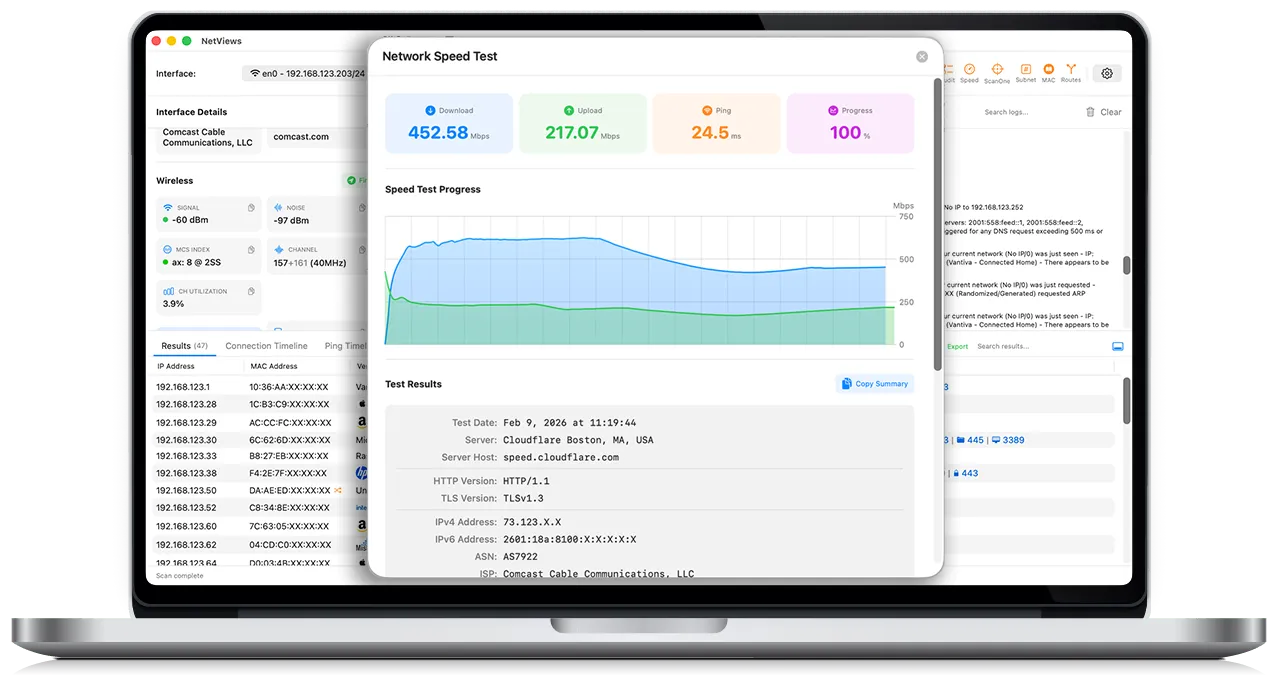
Minor suggestion. I found this because the UI looked cool and I wanted to see a more zoomed in view of it. But right now the "Take control of your network today" is the only place with a really readable view of the UI. Perhaps add a gallery of screen shots, showing off different features?
I have considered it, but it would lose a lot of features. It would have to be a "lite" version. To get what we need, we would have to use an external device (think Raspberry Pi) to get the information needed. It's something we are looking at... but as a network guy, I use stuff outside the app store every day (Wireshark, Ekahau, etc.) and have no issue with it.
I am not the OP, but my guess is that it uses APIs that disqualify it from the App Store. It looks like they are doing stuff with raw sockets and probably using some stuff from private 802.11 frameworks?
The app looks fantastic. I'll probably end up buying it.
Not the OP, but for me it's a combination of factors. For subscription software I like knowing I can cancel easily and will keep that subscription til the end of my current term. More generally it just means I know it'll be accessible to me in the future, regardless of whether your company goes bust and stops paying for the license activation servers.
They are less accessible in the future. Apps on the macOS App Store (as well as iOS, iPadOS, etc.) are taken down / removed from availability if the developer stops paying the Apple Developer Program subscription.
For me it’s dealbreaker that it’s available via homebrew.
Not a stance or anything, but when I get a new Mac I use homebrew bundle
If it’s not in my brewfile from old Mac, theres a high probability I won’t get it installed.
This is actually really cool. I use Homebrew all the time, but didn't know GUI paid apps were a thing. Wow. THANK YOU! Coming to brew line near you soon :)
I talked to you last month when you posted this. I did end up buying a copy, and it has been somewhat useful.
Three things, it drives me nuts when it migates to the localhost interface, but doesn't migrate back. Either, we need to lock to an interface, or just have the option to remove one.
Two, constantly bouncing in the dock is incredibly annoying and distracting. We don't need more distractions, we need less.
Three, showing the wifi mesh info has actually proven to help, but it would really be even more helpful if you could expand that to rates and more wifi protocols.
Hello!
I think I might have missed that feedback - please send again!
1) This has been fixed - if you update, it will automatically move back to the default gateway interface.
2) That can be disabled in the settings...
3) On it's way :)
Looks great I don't have a nees for it, but I'm also happy to see more specialized tools being built natively for macOS, despite Apple's poor releases lately. I have no plans to use anything but a mac in the near future, and normally am happy to pay for a well-crafted mac first app.
Did you use or have any problems with SwiftUI that you found workarounds for? It's been a while since I've played with it, but last I checked it was a bit underperforming and opaque
If I may offer a marketing suggestion - make it easy for people to do a “proam” workflow to setup their own network. A “one click to diagnose and visualize your Wi-Fi setup”. And then write content around that.
This tool looks more powerful than what I would use, but if there were a kid version, I’d like someone to tell me how to improve my network performance.
I've been thinking more and more about this - with all the crazy number of variables, it would be hard to code. So, I've been thinking of collecting EVERYTHING this gets, and then using AI to assist with a summary/description written for a 5-year-old :) Not sure I like the approach, but worth looking into.
Looks useful and I like the UI, it reminds me of UniFi. After a few minutes I had to force-quit and sent a report. I will buy it, I love messing about and have a reasonably complex home network and have been getting by with a mix of Unix and homemade tools; this is nicer.
Interesting! I haven't run into that. I've been doing a ton of testing to avoid things like that. If it happens again, would you mind emailing me the report via the website? I don't get them when sent to Apple.
>NetViews is a modern, macOS network scanning app inspired by the specialized needs of IT, engineering, and network professionals. It combines host discovery, port scanning, real-time monitoring, and vendor/DNS insights with a clean, native interface - giving you the tools you need without the complexity you don't.
Great job, I will give it a try.
As I'm more interested for personal use, can it help me find the best WiFi channel to use for my network, as I live in a dense populated area?
Yes - by telling you what ones NOT to use. Click audit and then Wi-Fi Checklist. Choose your network, and then it will tell you if you are on a good channel or not, automatically!
My first thought, as a network engineer, is that I already have access to pretty much every feature of this tool from the CLI. You ask if I would give that up for this app, and the answer is "not unless you integrate all the other CLI tools I use as features". Obviously, that's not reasonable, because my needs (like most engineers) are overly specific. You could never please everyone.
If this were an iPad/iPhone app, I would say that you nailed it, because this would be way easier and more complete than any of the tooling I have available on a mobile device right now. Otherwise, all of my other tooling is in the CLI, so I would ultimately be going out of my way to use this tool on my Mac.
The easiest fix I can think of is to open the door to third-party/community extensions so that people can add their own tooling to the app. You mention that this is largely a bunch of CLI wrappers, so it would be very helpful if we could write our own, and maybe even share them with each other.
Understood. Trust me, I still keep a few consoles open... but it's a lot fewer tabs with NetViews going because for my use cases, it's doing 95+% of the work without effort.